

5/29/26About 1 min
KKAuto User Guide
Welcome to the documentation for KKAuto customers. This guide describes how to use the Management Website and the desktop application following the product workflow.
How does KKAuto work?
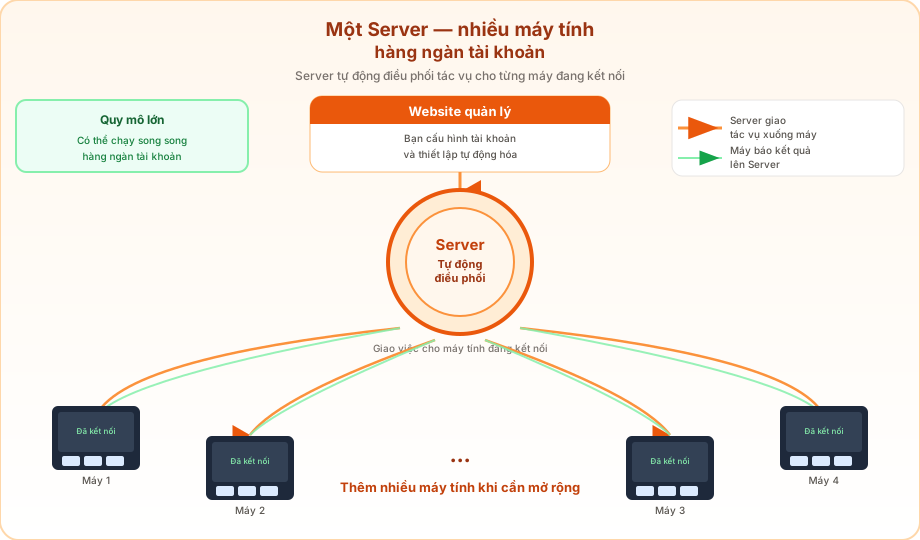
Step-by-step details: How KKAuto Works.
Setup Health on the Management Website
On the Management Website, the Setup Health section (from the Dashboard) shows your setup score, missing steps, and what to do next — no guessing which menu to open. See the detailed guide.
Recommended reading order
- How KKAuto Works — Central Server, computers receive tasks
- Getting familiar — Website menu map, day-one path
- Quick Start — Log in, install the app, connect for the first time
- System capabilities — profile, fanpage, group, seeding, comments, workflows…
- On the Server (Management Website)
- Setup Health — configuration guidance on the Management Website
- System Onboarding — the five-step flow from AI setup to group seeding
- Facebook Accounts
- Account statuses
- System Configuration
- External API Registration & Setup — get tokens for DeepSeek, TypeSafe.ai, OpenAI, Gemini, Claude, MiniMax, CapSolver
- Automatic Task Creation
- AI Posts
- Manage Fanpages
- Monitor Tasks
- Task statuses
- Notifications
- Proxies
- On your computer
- Plans and pricing — Cloud / Selfhost / VPS / GPM; live prices on kkauto.net
- Troubleshooting · FAQ
Security notice
Never share your password, verification codes, proxy credentials, or unredacted screenshots with third parties. If you need help, go to KKAuto > Support on the Management Website.
The AI Q&A assistant (when enabled on this site) uses only published guide content — see AI assistant knowledge sources.